What is an extended menu
When you open Vault Synapse, you will see a list of symbols that represent all the modules. They will be placed under each other in a column on the left-hand side of the screen. Hover the mouse over any of the symbols to view a brief description of the module. You can expand the menu of modules for each company to view the available modules in more detail. More complex items consist of a sub-menu of modules which are related to the parent module. A sub-menu is indicated by the  icon next to the parent module. The menu of modules you can view will depend on your organization purchase plan, meaning it might differ from the description and pictures below.
To view details about all the modules at once, press the  icon next to the company logo and click on a company.
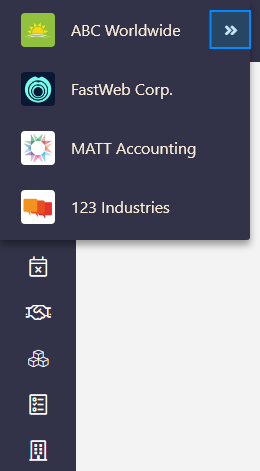
You can now view all the modules that have been configured for the company all at once and in more detail.
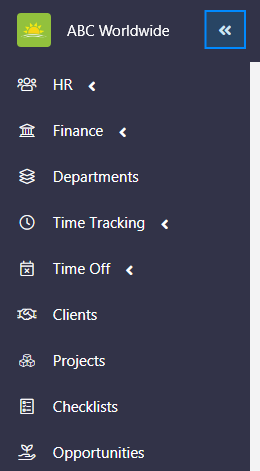
The menu of modules contains:
- HR – A parent module related to all HR agenda which contains:
- Personnel – Keep everything you ever need regarding your employees in one place. This includes their basic info, contracts, payroll information, documents, skills, absences, time tracking, project allocations, monthly performance, and collaboration with co-workers. The data is secure and accessible with a few clicks. Click the link to find out more about the Personnel module.
- Evaluations – Shows the history of evaluation plans as well as current evaluation plans and its progress completion. You can also create evaluation plans from here. Click the link to find out more about the Evaluations module.
- Job Management – Gives an overview of open, on hold, and closed company positions along with their location, type, department, job manager, and more.
- Candidates – Allows you to track the whole hiring process and to store a variety of related data.
- Ideas – Anyone with access can submit ideas through this module. Ideas are displayed by their stages – just arrived, considering, development, planned, out of scope, and delivered.
- Polls – Create polls to let your personnel decide on issues and view voting results.
- Skills – Captures the spectrum of personnel skills type and their level. You can view what areas personnel excel at and where a lack of skill is present. Keep the skill set data up to date by evaluating personnel skills regularly.
- Admissions – Manage the process of enrolling and tracking students that are taking up a course with the organization. The process is facilitated with the use of checklists that can be applied to each student, allowing you to track their documentation and payments.
- Finance – A parent module that covers a large facet of bookkeeping. Store files, track expenditure, monitor income, submit transactions for approval, plan and view financial prognoses, and much more with this module which consists of:
- Bank Accounts – View all bank account balances in one window, file documents, record bank accounts details and contacts, and update balances here.
- Invoices – Displays the total amount of paid invoices, overdue invoices, and invoices that aren’t due yet. View invoices by client, status, due date, and more. You can record payments and store documents here.
- Vendors – Store information and contracts about vendors in one place. Users with access can review every vendor and get information about tasks, assets, or transactions bound to a specific vendor.
- Purchase Orders – You can control the purchase of products and services from external suppliers by creating purchase orders.
- Incoming Center – Is a virtual desk for receiving documents from external users. All your business communications channels can be managed from the incoming center.
- Decision Center – View pending and resolved transactions here. Approve or reject transactions, purchase orders, and incoming items. You can monitor financial activities from this module.
- GL Accounts – General Ledger allows you to log expenses and revenue individually for each account type your organization might use.
- All Months – Displays a summary of expenses for each month. Select any month from the past to view personnel cost history, company expenses, and fixed costs. Click the link to find out more about the All Months module.
- Business Trips – Log business trips in this module to monitor cost and view the status, participants, dates, and clients. Create a shared link for clients so that they can view receipts and expenses. You can also edit, print, and share travel documents with participants.
- Departments – Manage your company’s departments by keeping track of their projects, personnel, time management, and financials.
- Time Tracking – This is a parent module. You can view personnel time tracking entries from your chosen time period. A summary of hours worked and tracking status will be also displayed. Click the link to find out more about the Time Tracking module. This module consists of:
- Time Reports – Generate a summary report of hours worked for a specific period by selecting specific criteria such as Project, Name, Entity Type, Tasks, and more. Click the link to find out more about Time Reports.
- Time Off – Tracking attendance has never been easier. Employees can now ask for time off, whether it is a holiday or a sick day, with a few clicks before a manager approves or denies their request. Employees also can view their remaining time off balance and time off requests history. Click the link to find out more about the Time Off module. This is a parent module which also contains:
- Time Off Roster – View, edit, deny, or approve time off requests for personnel. Click the link to find out more about the Time Off Roster.
- Clients – A large menu of elements can be chosen to display clients’ information. From basics like names, master client, and projects to boards, invoiced amount, and more can be configured.
- Projects – Provides a complex overview of projects with their status, budget, checklists, boards, assets, time tracked under projects, and more. Click the link to find out more about the Projects module.
- Checklists – An easy way to prepare templates for recurring tasks. Users can run repetitive tasks within a specific checklist, assign them to other employees, measure the time spent on tasks, and track their progress.
- Opportunities – Has your company received an opportunity to acquire a new client? Here you can save new opportunities and define their status, stage, source, value, key dates, collect documentation, store contacts or even create an onboarding checklist for when the opportunity becomes a client.
- Offices – Perfect for managers who like to organize their office. It provides an overview of time tracking and time off regarding personnel in an office, the assets used in an office, and helps monitor expenses and income of office financials.
- Assets – Take control of your company's assets. Detailed information regarding every asset can be found in this module. Track assets by location, assignee, warranty, and expiration date.
- Contracts – A place to store and organize contracts. View if any action is required, key dates, when the last change was made, the date it was signed, and more here.
- Leads – This module allows you to keep detailed information covering a range of topics about potential clients in one place. Customize your view and add, remove, and rate leads here.
- Contacts – Whether it’s a bank, client, contractor, or charity, all organization related contacts can be stored, organized, and managed with this module.
- Consents – Whether required by law or by your organization, this module provides space for adding, monitoring, publishing, and archiving documents. You can view signature completions in percentage, descriptions, creator, and more depending on your viewing preferences.
- Shared Spaces – Need to share Vault Synapse documents outside of the software? Shared Spaces offers a place where an external user can access these documents securely.
- Custom Forms – This module lists all custom forms and allows you to view and edit their details, view who they are shared with, see entries, users, and more. You can also create or delete forms from here.
- Integrations/External Systems – Vault Synapse can be integrated with any third-party app you use. For example, Jira, Unfuddle, Wufoo, and Google Drive to name a few.
- Teams – Setup and manage your company's teams by keeping track of the members and their roles, as well as time tracking and time off.
- Users – This module provides you with a host of information about users and their activity. You can access their profiles, view user access, password age, and more. Customize the view and add new users from this module.
- Locations – View all locations and its details, maps, addresses, geocodes, attached files, and more with this module.
Didn’t find what you were looking for?
Contact us and we’ll build the right solution for you. Vault Synapse can be fully customized based on your business needs.