What is project basic info
Basic information about a project is a form holding all the essential information that you need to know about a project.
Here you can find the basics like the name of the project and client, but you can also edit a project description, type, phase, status, start and finish date, project coordinators, members, whether it’s billable or not, and much more. Assign a color to a project to be linked with graphic information so that you can spot the project on a dashboard straightaway, monitor its progress, and keep an eye on any alerts. If you need to make changes to the basic info form, add or remove members, etc. simply open the form, edit, and save your changes any time you need to.
To view information about a project, go to the Projects module and click the Basic Info tab in a project's page.
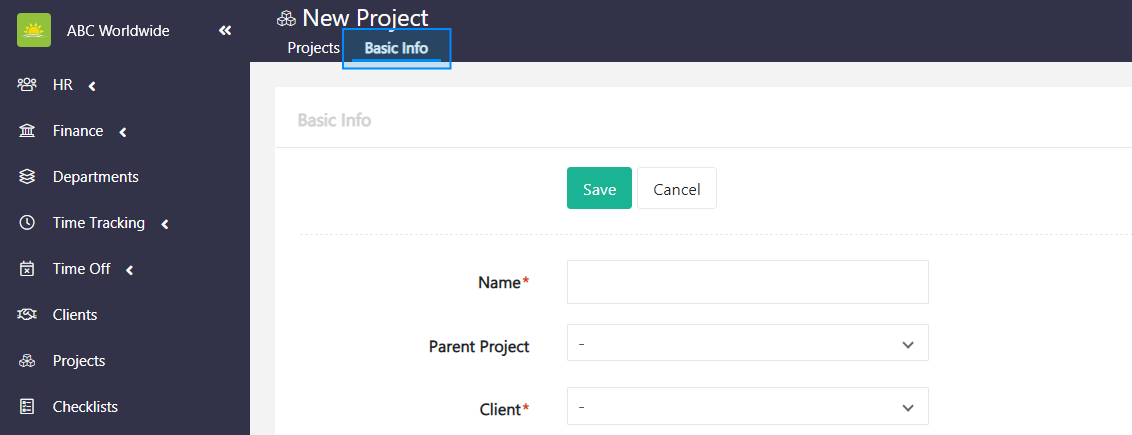
The Basic Info form contains the following:
- Name – The name of the project.
- Parent Project – The name of the parent project that’s linked with the project. Parent projects can be defined in the Projects module. Click the link to find out more about parent project vs child project.
- Client – The name of the client that’s linked with the project. Clients can be defined in the Clients module.
- Department – The department that will handle the project. Departments can be defined in the Departments module.
- Type – The project type that the project belongs to. Project types can be defined in the Organization Configuration by an administrator.
- Short Name – Abbreviation of the project name.
- Phase – The project phase that the project belongs to. Project phases can be defined in the Organization Configuration by an administrator.
- Status – The project status that the project belongs to. Project statuses can be defined in the Organization Configuration by an administrator.
- Start Date – The start date of the project.
- Finish Date – The finish date of the project.
- Description – Description of the project in more detail.
- Color – A color to connect your project with. This color will follow the project throughout the system.
- Project Coordinators – Members who will coordinate the project. You must have at least one user entry in the Users module for this list to populate. Project coordinator role is defined in Security Roles.
- Project Members – Members who will work on the project. You must have at least one user entry in the Users module for this list to populate. Project member role is defined in Security Roles.
- Companies – The company to connect your project with. This will have an effect on the visibility of the project in that company. You can select more than one company. Companies can be defined in the Organization Companies by an administrator.
- Is Billable – Billable or not? If it's ticked, the work on the project is invoiced to the client.
- Is Active – Active or not? If it’s ticked, the project will show up in the system under Active State. Unticking this checkbox will result in changing the project state from Active to Inactive.
Note! Vault Synapse is a highly customizable tool, meaning certain fields can be additionally customized based on your business needs and preferences.
Note! A user can access the project information only with the relevant permissions/access rights given by the administrator.
Didn’t find what you were looking for?
Contact us and we’ll build the right solution for you. Vault Synapse can be fully customized based on your business needs.